Coming soon to Android

Meet CueIQYour AI-powered pool coach

See the table differently.

Photograph a table and see the shot. Practise it with drills built on real physics. Try any shot yourself. Keep score when it counts.
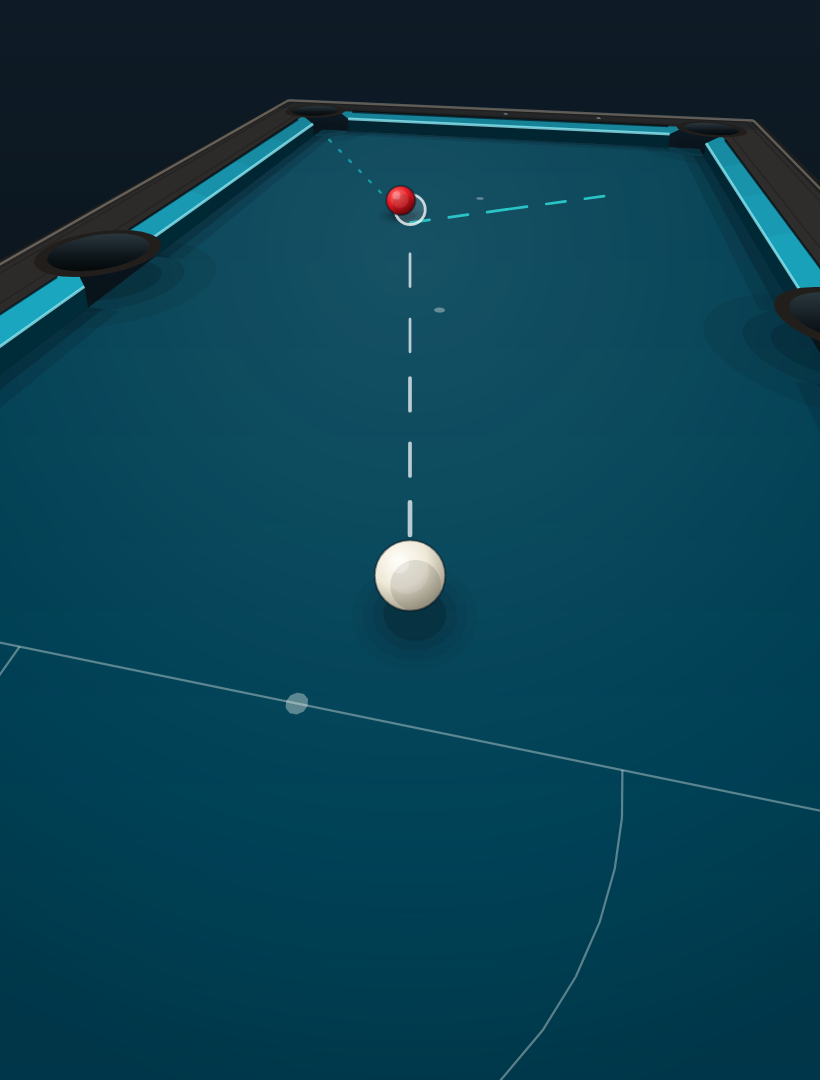
The CueIQ Shot Lab seen from the player's eye, with the path of a shot previewed on the table
Built for English-style 8-ballNo account to createScores and progress stay on your phoneAndroid first

Why CueIQ exists

Knocking balls around is fun. It isn't always how you get better.

Most tools focus on one shot at a time. Real improvement comes from the angles, the cue-ball control and the position that connect your shots.

CueIQ is built to show you why a shot works, not just whether it went in, and to turn every session into a chance to get a little better.

Explains, not just instructs

Every recommendation comes with the reasoning, so you build understanding instead of following arrows.

Thinks beyond the next shot

Angles, cue-ball control and position connect your shots. CueIQ plans the route, not just the pot.

Practice with purpose

Drills teach one thing at a time and get harder as you improve, replacing random knocking about.

Inside CueIQ

Four ways to play smarter.

Analysis Centre

One photo. A plan for the whole table.

Photograph the table, choose the rules and which balls are yours, and CueIQ reads the layout and works out a route around it.

  • Finds the balls, the cushions and all six pockets from a single photo
  • Recommends your first shot and explains why it is the right one
  • Plans the cue-ball position for the shot after, and warns what to watch out for
  • Lays out the whole route ball by ball, with a tip for each shot
  • Plays the route back as an animation, checked with real physics

The table reading is an estimate. CueIQ shows how confident it is, and you can check the reconstruction against the real table before you rely on it.
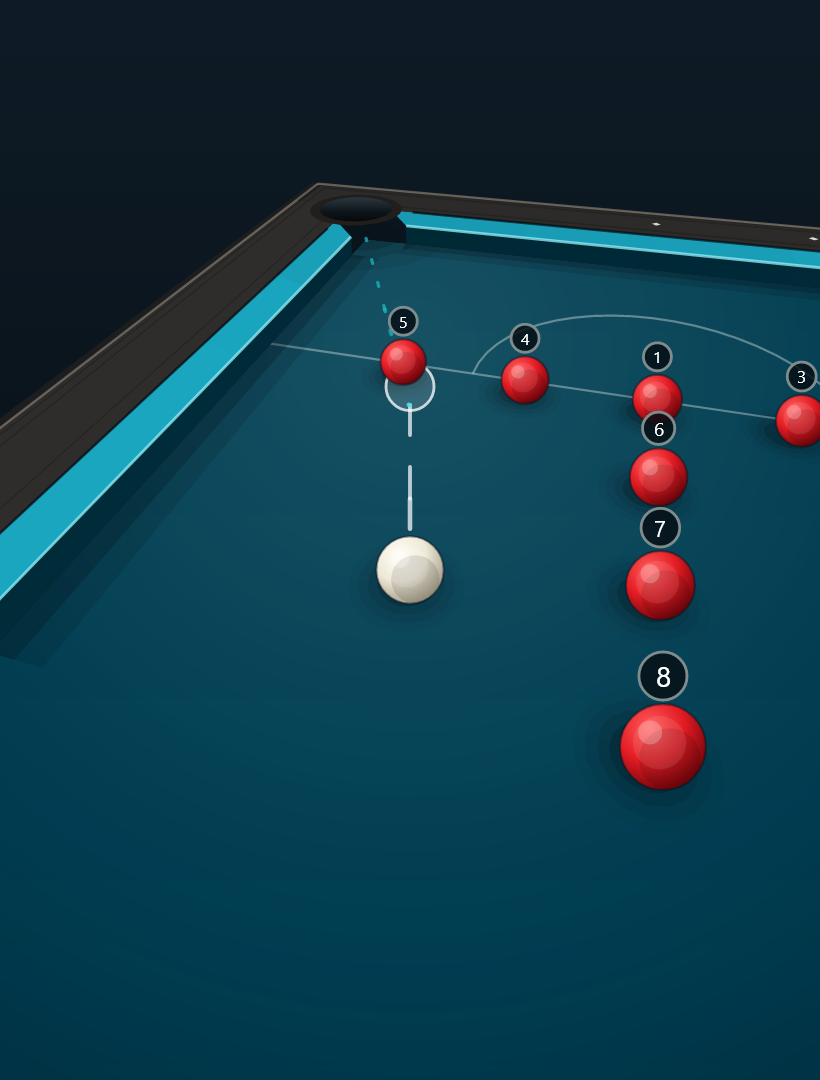
A route around the table in the player's eye view, with each ball numbered in the order to pot it

Training Centre

Drills that teach one thing at a time.

Dozens of drills from beginner to advanced, grouped by what they teach: fundamentals, cue-ball control, pattern play and position practice.
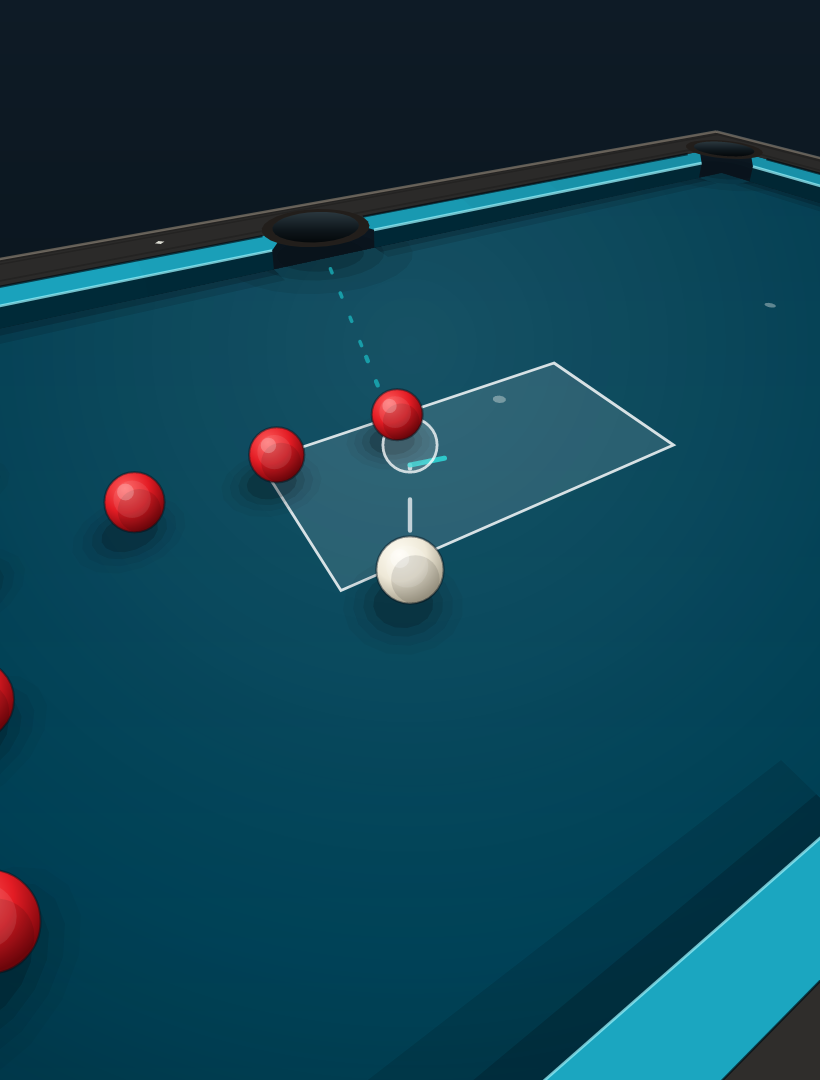
  • Every drill is an animated demonstration with the aim line, ghost ball and target zone
  • A floating cue ball shows exactly where to strike it, and a power bar shows how hard
  • Progressive drills have levels that make the same skill steadily harder
  • Search and filter by type, skill or progress
  • Record your progress and watch your mastery grow by category
A drill shown from the player's eye, with the aim line, ghost ball and target zone

Shot Lab

Set it up. See what happens.

Put any shot on the table yourself and see what the physics predicts before you take it.

  • Drag to aim, and drag the balls to wherever you like
  • Choose the power, and where to hit the cue ball: follow, draw or side spin
  • A live preview shows the white's path, the ghost ball and where each ball goes next
  • Tap Shoot to watch it played, from above or from the player's eye
  • Powered by the same physics engine as the drills

The Shot Lab shows what the physics engine predicts. Real tables, cloth and cues vary, so use it to understand a shot, not as a promise.

The Shot Lab previewing a shot on the table

Match Centre

Scoring that keeps up with your game.

A proper scoreboard for the match you are actually playing, with the history to look back on afterwards.

  • Race to 3, 5, 7, 10 or your own target, best of 5, 7 or 11, or just play casually
  • Save your opponents and see your record against each of them
  • Tap a player to award the frame, and undo if you slip
  • Keep a tally of 8 balls cleared in a visit, and see it in your stats
  • A shot clock with 30, 45 or 60 second timers and extensions
  • A coin toss to settle who breaks
  • Match statistics: matches played, win rate and frames won and lost
  • Every completed match saved to a history, and an unfinished match you can resume

The player's eye

Stand where the player stands.

Every drill, route and Shot Lab shot can be switched from the view from above to the view from behind the cue ball, looking down the line of the shot, the way you see it when you are bent over the table.

It is a quick way to learn what a shot actually looks like at the table, and to see where the cue ball is going before you take it.

How it works

From photo to better shot in three steps.

01

Photograph the table

Stand high, keep all six pockets in shot, and take one clear photo.

02

Get the plan

See the recommended shot, the reasoning behind it and the route around the table.

03

Practise and play

Take the skills to the drills and the Shot Lab, then keep score when it counts.

How to use CueIQ

Everything you need to get started.

Guides like these are built into the app too, so help is always one tap away.

Analyse a table
  1. Take a photoStand as high above the table as you can and capture the whole table, all six pockets included.
  2. Analyse the tableTap Analyse table. CueIQ detects every ball and reports how confident it is in the scene.
  3. Check the digital twinThe reconstruction is an estimate. Compare ball and cushion positions with the real table before using route guidance.
  4. Your first shotSee the recommended shot, why it is the right one, a cue-ball plan for position, and what to watch out for.
  5. Shot sequenceBrowse the full suggested route ball by ball. Tap any shot for its own instruction, reasoning and cue-ball tip.
Take a good photo

A few seconds of care here makes a real difference.

  1. Get highStand as high above the table as you can, straight down over the balls.
  2. Show the whole tableKeep every rail in shot, including all six pockets if possible.
  3. Mind the lightEven, bright light works best. Avoid shadows falling across the balls and heavy glare.
  4. Retake if in doubtA steep side angle, a cropped table or a blurry shot make the table harder to read.
Practise a drill
  1. Pick a drillBrowse the categories, or search and filter by type, skill or progress.
  2. Watch it playedPress Play to see the shot, with the aim line, ghost ball and target zone. Flip the table to see it from the other side.
  3. Read the floating cue ballIts position shows where the cue ball is struck, and the bars below show how hard, from soft to full power.
  4. Choose a levelOn drills with levels, tap a level to make the drill easier or harder.
  5. Record your progressMark a drill or level complete and watch your mastery build by category.
Use the Shot Lab
  1. AimDrag on the table and the cue ball aims. A dotted line shows where the white goes, the ghost ball shows where it meets the red, and the lines beyond show where each ball travels next.
  2. Move the ballsDrag the white or the red anywhere you like. They rest against the cushions and cannot overlap.
  3. Set the powerSlide from Soft to Power. The preview updates as you go.
  4. Choose the spinDrag the dot on the white ball. Above centre is follow, below is draw, left or right is side spin.
  5. ShootTap Shoot to play the shot. Replay plays it again, and touching the table afterwards sets up another.
  6. Change your viewTap Player's view to see the table from behind the white. Drag left or right to turn your aim, and tap Top view to go back.
Keep score in the Match Centre
  1. Start a matchEnter your name, add an opponent and pick a format: best of frames or your own target.
  2. Score a frameTap a player's card to award them the frame. Tap Undo if you make a mistake.
  3. Shot clockOpen the clock during a match, tap it to start, and set a default duration in its settings.
  4. Coin tossSettle who breaks with a tap.
  5. Match statisticsSee your overall record: matches played, win rate and frames won.
  6. HistoryEvery completed match is saved. Tap an opponent to see your record against them.
  7. Finish upA match completes when the target is reached. Playing casually? Tap End Match to stop early.
Understand spin

Where you strike the cue ball decides how it spins.

  1. FollowAbove centre: the cue ball rolls forward. Add left or right to curve it.
  2. StunDead centre: no spin at all.
  3. DrawBelow centre: the cue ball draws back. Add left or right to curve it.
  4. Side spinLeft or right of centre spins the ball in that direction.
  5. Avoid the miscueKeep contact within the middle two thirds of the cue ball.
Build your stance

A consistent stance means a consistent stroke.

  1. FeetBack foot a comfortable stride behind the front foot, weight balanced between both.
  2. BodyLean forward from the hips, front knee softly bent, back leg braced.
  3. Cue armUpper arm hangs close to the body, forearm meets it at roughly a right angle at address.
  4. EyesChin down, eyes directly over the cue line for a true, repeatable aim.

Honest by design

It tells you what it knows, and how sure it is.

Coaching you cannot trust is worse than no coaching. CueIQ reports how confident it is in a table reading, labels its reconstruction as an estimate, and describes the Shot Lab as a prediction, not a promise.

There is no account to create. A table photo is sent securely to be read and is not kept, and your match scores and drill progress stay on your phone.

Questions

Good questions.

When can I get it?

CueIQ is heading to Android first. Follow the journey or get in touch and we will let you know when it is ready.

Do I need an account?

No. CueIQ does not ask you to create one.

Which rules does it use?

CueIQ is built for English-style 8-ball, with reds, yellows and the black. In the Analysis Centre you choose the rules and which balls are yours.

Does it work without a photo?

Yes. The Training Centre, the Shot Lab and the Match Centre do not need a photo at all, and they run on your phone. Only the Analysis Centre needs an internet connection, to read your photo.

How accurate is the table reading?

No reading of a photo is perfect. CueIQ shows how confident it is, and you can check the reconstruction against the real table before you rely on the route.

What happens to my table photo?

It is sent securely to CueIQ's analysis service, read, and turned into a result. CueIQ does not keep the photo. Match scores and drill progress stay on your phone.

Does the Shot Lab guarantee the result?

No. It shows what the physics engine predicts. Real tables, cloth and cues vary, so it is there to help you understand a shot.
See the table differently.

CueIQ is coming to Android. Follow the journey, or get in touch to hear when it is ready.